Your path to a faster and smarter inspection process with Twinsity
From data capture to finished inspection report, Twinsity covers every step of the digital inspection workflow. Here’s how the process works, and how it’s faster, more accurate, and more useful than traditional approaches.

Generating and processing the data
First, a large number of images of the object of interest must be captured, which is often done with a drone. Then, these images are converted into 3D models using reconstruction software. Twinsity supports leading photogrammetry solutions, including Agisoft Metashape, Bentley ContextCapture, RealityCapture, PIX4Dmatic and DJI Terra.
Upload

Next, the images, models, and camera metafiles are uploaded to Twinsity. This is easily done with a few clicks through your Twinsity account. After successful upload, both the model and the original images can now be viewed in Twinsity.
Inspect
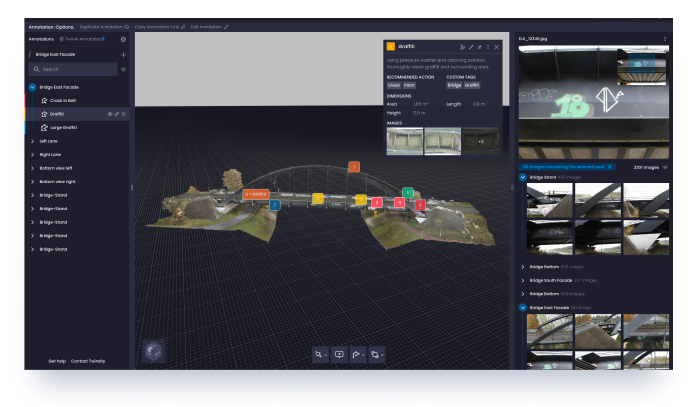
You will now find the completed model with the associated images in your dashboard and the inspection can begin. Intelligently linked images to the corresponding point in the 3D model makes your inspection even faster. Any surveying and marking tools can now be used with ease.
Share and communicate faster

Because Twinsity is a web application, data and analysis can be easily shared with staff and clients. No manual reporting anymore: with Twinsity, experts get powerful reporting functionality to generate norm-compliant and custom inspection reports in various file formats.
Documentation and archiving

In order to also be able to guarantee attributes such as better security, better collaboration, more flexibility and automation when it comes to data backup and archiving, all of our data is backed up and protected via the cloud computing provider AWS.