The new Twinsity is here
Twinsity™ V2 is live: a rebuilt interface, a single home for your projects, and a builder that lets your team define what it records rather than working to somebody else’s structure.
Somebody has to know the condition of these assets. And prove it.
That is the job, and it has not changed. What has changed is the platform the work is done in. Today we are releasing the largest update to Twinsity since we launched.
Inspection is hard enough. The software should not add to it.
Your standards, not ours
Every inspection team already has its own set of questions it asks about what it finds. Sometimes a client standard sets them, sometimes internal quality assurance does, sometimes twenty years of practice does. Whatever the source, the questions are settled long before anyone opens a piece of software.
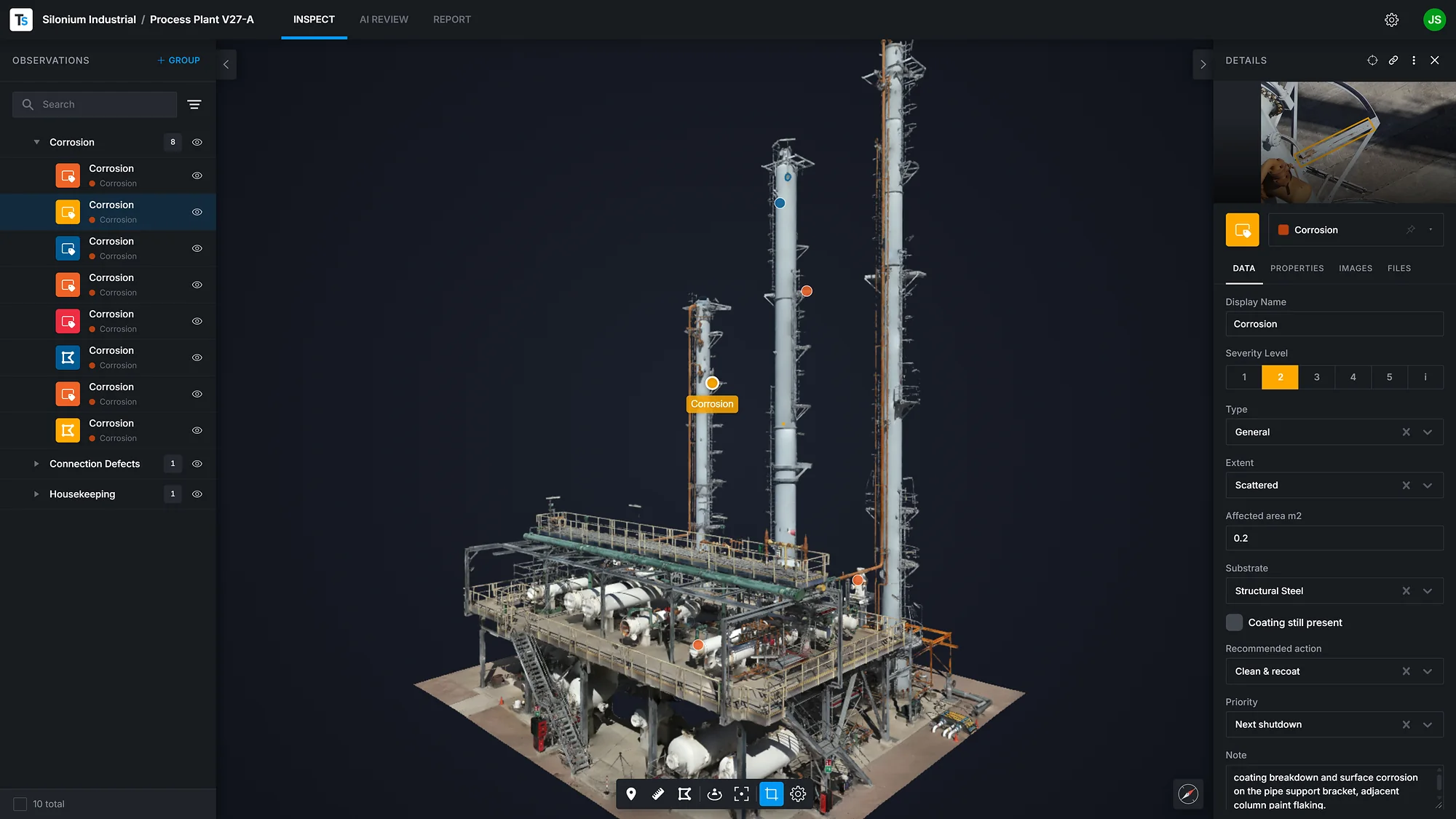
The Observation Profile Builder lets a team replicate that inside Twinsity. You define the Observation Classes you record and the Fields you record against, in the order you work and in the language you work in. When an inspector marks something on the model, the form that opens is the one your team built.
This is not a new idea. Every team already has its standard. The point is that the standard transfers without change, and that the platform adopts it rather than asking anyone to work differently.
The Observation Profile Builder is available on Pro and Enterprise plans, and Prospector customers have free access to it at launch.
A single home for your work
The second change is the one you see first. The new project management area replaces a set of separate pages with one place: your projects, your workspaces, your people and your Observation Profiles, all in view. Projects are listed and sortable. Opening one slides it in beside what you were already doing. Moving between organisations and workspaces is one control rather than a journey.
Inside a project, the three things you do, inspect, review the AI’s detections, and build the report, sit side by side as tabs.
The project management area is available on every plan.
Built for large jobs
A real inspection produces hundreds of Observations, not a handful. So Observations now organise into Groups, select in ranges, and move or delete in bulk. The filter works by shape and by Observation Class at once, and filtering the list also filters the 3D scene, so what you are looking at and what you are reading always agree.
The 3D view is calmer and sharper. Simpler camera controls, with free movement through a space and momentum that makes a tunnel or a tank navigable rather than fiddly. Go to an Observation and the camera flies in and frames it square to the surface it sits on, so you see it the way it was captured.
Drawing on an image now works the way drawing should: drag it, place it, take hold of a corner and move it.
Reports have their own area now, with the finished PDF previewable without leaving Twinsity.
The AI detects, the inspector decides
Twinsity’s AI does what it has always done here. It works through the images so that a person does not have to start from a blank page, and it surfaces what may be worth looking at. The inspector confirms, corrects or dismisses it.
That division matters, and it is deliberate. The value is not that a machine has an opinion. The value is that every image has been reviewed, and that you can show it.
Prove nothing was missed
That is the whole of it. An asset owner asks a question, and somebody has to be able to answer it with evidence. Everything in this release is in service of making that answer easier to produce and harder to argue with.
The new Twinsity is live today for every customer. Your existing links and bookmarks continue to work.
When you have 100% documentation and you find a defect in the future, you can go back and confirm whether it was there before.Claes Bergholt Hviid, Business Development Manager, COWI