

Twinspect Release. Check it out!

AI-assisted defect detection for bridge inspection
17. March 2025
We are pleased to announce the Twinspect 2026.14.0 release, bringing several important improvements to the project upload workflow, model rendering, and tileset compatibility. This update focuses on simplifying project creation, improving performance, and expanding compatibility with common photogrammetry workflows used by inspection professionals. Below is an overview of the key improvements included in this release.
Local Tileset Support
Twinspect now supports local (non-georeferenced) tilesets during project upload. Projects created with photogrammetry software that use local coordinate systems are now automatically detected and rendered correctly within the platform.
This feature currently supports projects generated with:
- Agisoft Metashape
- Bentley iTwin Capture (ContextCapture)
- DJI Terra
Local tileset support is currently not available for RealityScan due to limitations in its export format. We are actively investigating solutions together with the OEM. If you are using RealityScan with local coordinate systems, please contact our support team for possible workarounds.
Automatic Rendering Quality Optimisation
3D models now automatically load with optimised visual quality settings. The system analyses each model and selects the best balance between visual detail and performance. This configuration is saved per project to ensure consistent rendering quality across sessions and devices.
Users can still manually fine-tune the rendering quality using the quality slider available in the project preview and 3D viewer.
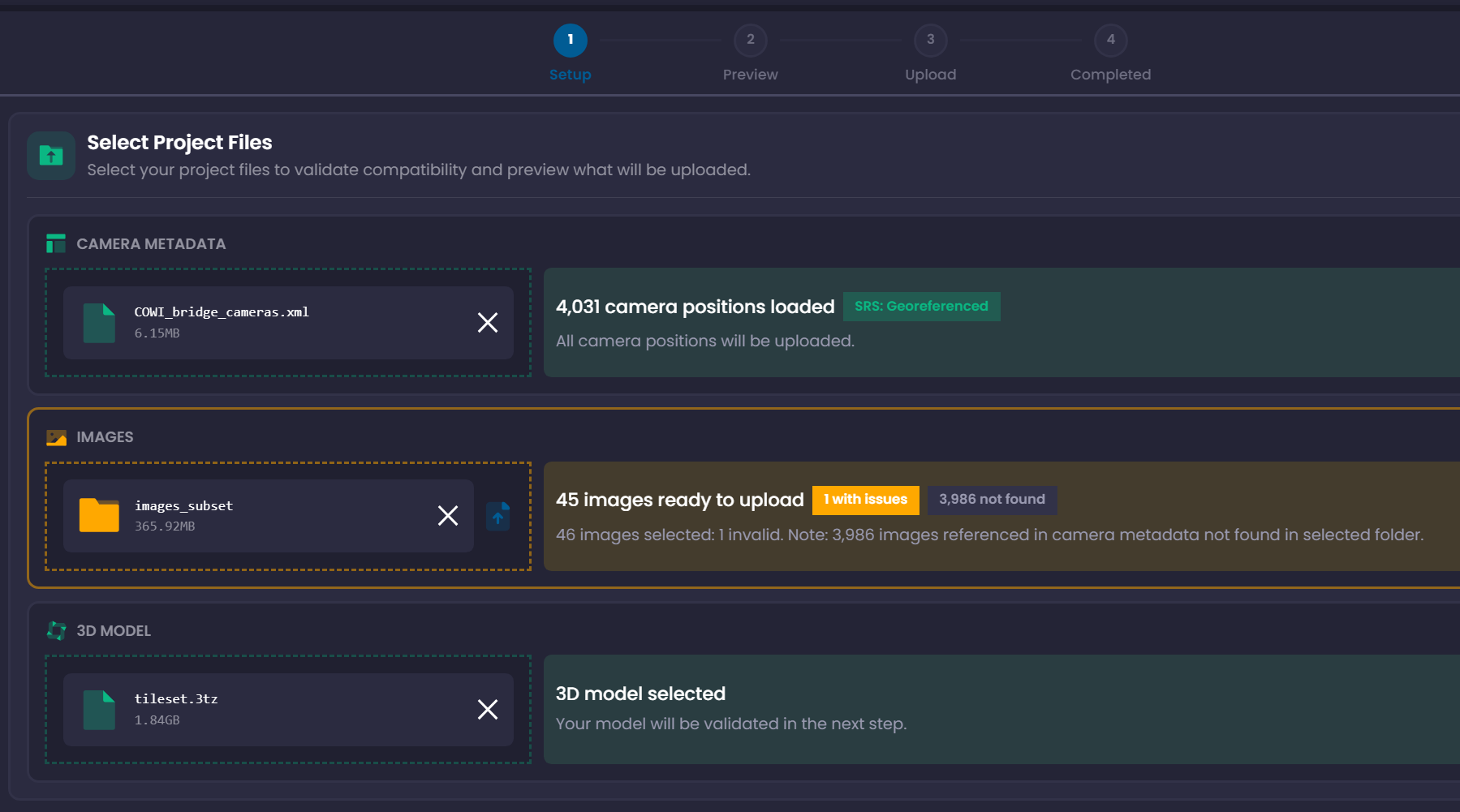
Redesigned Project Upload Workflow
Uploading new inspection projects is now significantly more intuitive thanks to a major redesign of the project creation workflow.
New full-screen upload interface
The upload process now uses a full-screen layout, providing a clearer and more immersive project setup and verification experience.
Pause and resume uploads
- Uploads can be paused and resumed at any time
- If the browser closes during upload, the workflow offers to continue where it left off
Improved project preview and image verification
- Image thumbnails load faster
- Clicking a thumbnail opens an expanded zoomable view
- Selecting a location on the 3D model highlights the corresponding camera position in the image
Clearer validation feedback
The validation step now provides structured results for camera metadata, model status, and image-to-model alignment, helping identify potential issues before uploading the project.
AI model selection during project setup
Defect detection models can now be selected directly during project creation. AI model availability depends on the licence type used on the platform.
Additional improvements
- ZIP file support for Metashape project uploads
- Automatic detection of tilesets with non-standard filenames
- Improved overall performance of the project preview page
Bug Fixes
- Fixed an issue where RealityScan projects could display incorrect camera orientations
- Fixed rendering issues affecting certain georeferenced tilesets
- Resolved problems when resuming interrupted uploads
- Fixed project setup data not being preserved correctly between workflow steps
In addition to the fixes listed above, several user interface improvements were implemented to further enhance the overall Twinspect experience.
As always, user feedback remains an important driver of our development. If you have suggestions or encounter issues, please contact us at support@twinsity.com.


